Real-time Google Calendar sync on macOS

Picture this. You're on a call, laptop in front of you. The other side says "actually, can we push to tomorrow at 10?" You tab to Google Calendar in the browser, drag the meeting, say thanks, close the tab. Two minutes later you glance at the hora menu bar. It's still counting down to the old slot. Five minutes from now, maybe, it'll catch up. Until then, the calendar on your desk is quietly wrong.
That's what 5-minute polling feels like. And for the last three days I've been tearing it out.
hora Calendar — the native macOS calendar app I've been building in Swift and SwiftUI — now gets real-time Google Calendar sync: changes show up on your Mac in under three seconds, via a silent push pipeline on top of Google's events.watch, a small Cloudflare Worker, and APNs silent push. This post is why that matters more than it sounds like it does, and what the plumbing looks like from ten thousand feet.
Why 5-minute polling breaks Google Calendar sync
Polling every five minutes feels like a reasonable compromise — it's what most third-party calendar apps do. It's also wrong. Not technically, but experientially. Here's what five minutes of lag actually buys you:
- Double-bookings you can see happening. Someone in Slack asks if you're free at 3. You glance at hora. You say yes. The meeting you accepted on the web two minutes ago doesn't show up for another three.
- Invitations you already answered. You RSVP in the Google Calendar web UI. The hora menu bar still shows the red "unanswered" dot. Every glance is a half-second "did I forget something?" spike.
- Countdowns that are wrong by default. A collaborator reschedules a 1:1 five minutes before it starts. Your next-meeting widget cheerfully tells you the old time. You show up late.
- The trust problem. Once you've seen one of these, you stop trusting what the app shows. You double-check in the Google Calendar web UI. At that point you're not really using hora.
Most of the pain isn't catastrophic failure — it's the hundred little moments where the calendar and reality disagree, and you end up tabbing to Chrome to verify. A calendar has exactly one job: be right about what happens next. Five minutes of stale data is five minutes of not doing that job. For a Mac-native calendar app that's trying to earn a permanent spot in your menu bar, that gap isn't acceptable.
What real-time Google Calendar sync actually means
"Real-time" is a word people throw at anything faster than hourly, so let me be specific about end-to-end latency.
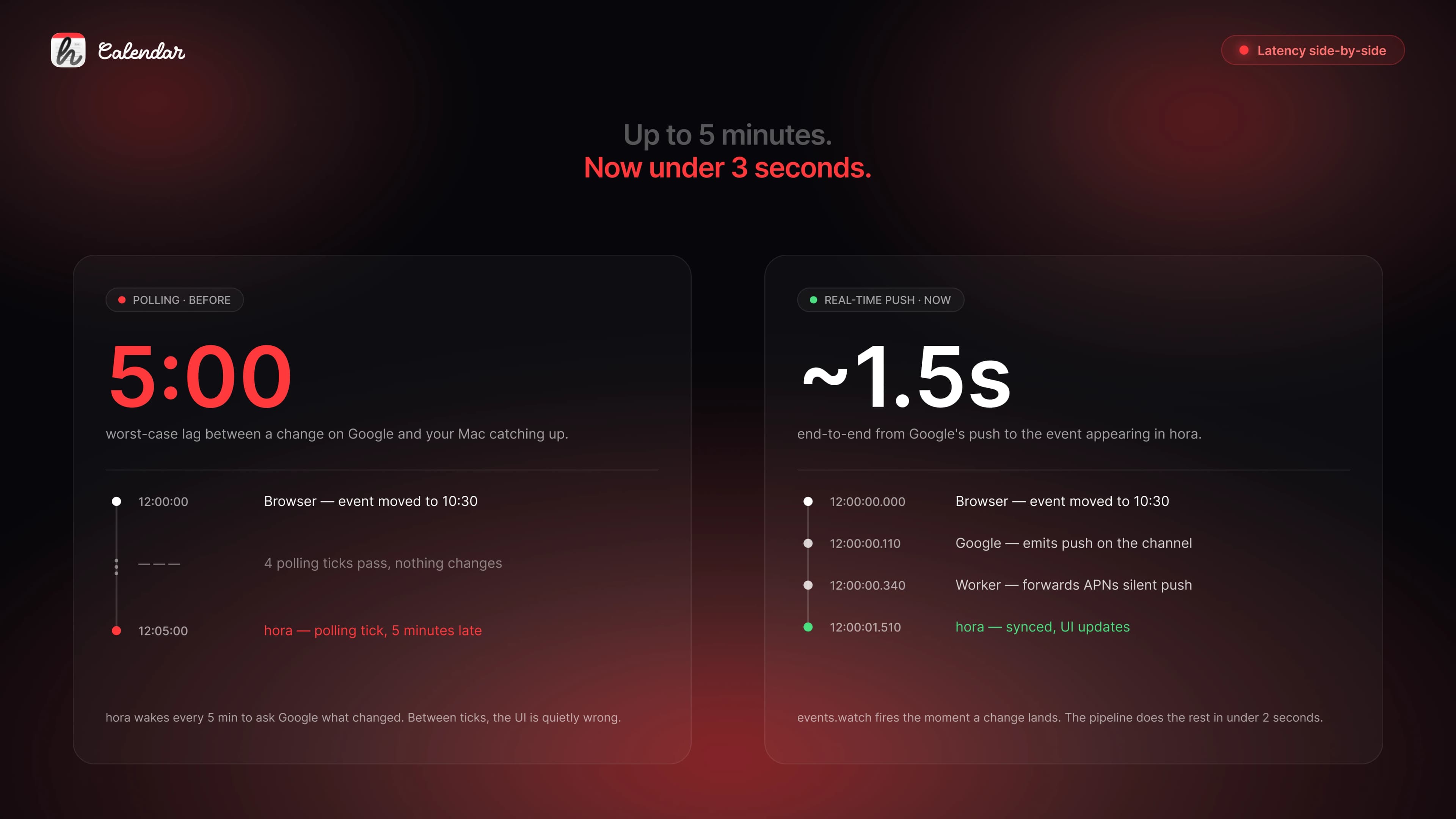
When you change an event in Google Calendar — from any client, on any device — hora sees the change and updates on screen in under three seconds, typically closer to one. Not on next sync. Not after you click back into the app. Right then, while the browser tab is still open.
| Change happens | Polling (before) | Real-time push (now) |
|---|---|---|
| RSVP on the web | Up to 5:00 | ~1.5s |
| Organiser reschedules a 1:1 | Up to 5:00 | ~1.5s |
| You delete an event on web | Up to 5:00 | ~1.5s |
| Countdown widget reflects it | 5:00 + widget tick | Next widget tick |
The result: hora's menu bar countdown, its week view, the WidgetKit complication — all reflect reality in roughly the time it takes Google to round-trip a webhook. On a cold MacBook waking from sleep, a little longer. On a desk that's been open all day, usually under a second.
How the Google → Cloudflare Worker → APNs pipeline works
Four moving parts. None especially clever on their own — the value is in stitching them together into a real-time Google Calendar sync pipeline.
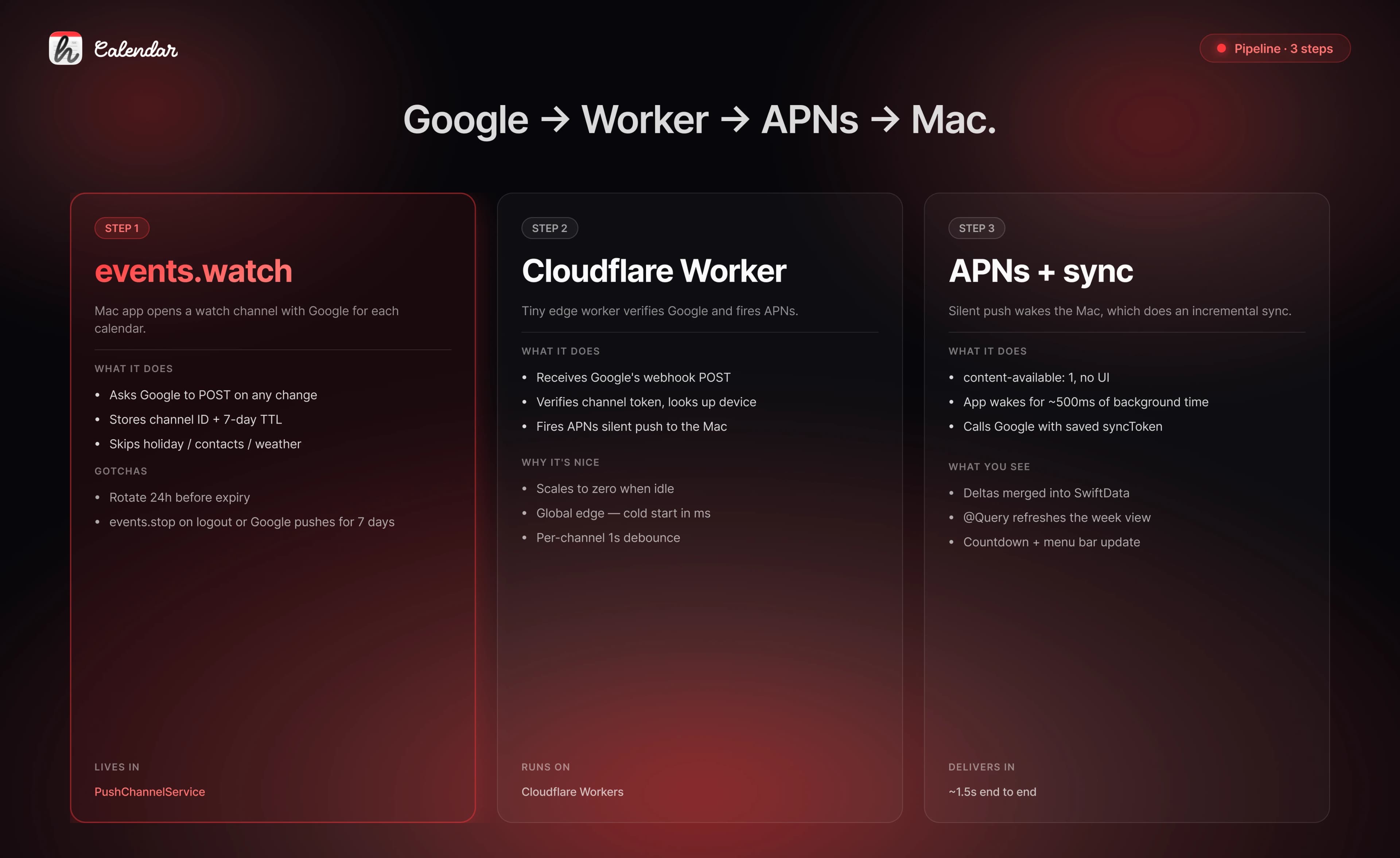
1. events.watch channel. When hora sees a calendar you're syncing, it asks Google Calendar: "when anything changes on this calendar, please POST a notification to a URL I control." Google confirms with a channel ID and an expiration date (max 7 days out). This is Google's push notifications API — publicly documented, widely used, and criminally underused by consumer calendar apps.
2. Cloudflare Worker. The URL Google POSTs to is a small Worker I run. Cheapest always-on infrastructure you can buy — globally distributed, scales to zero when idle, cold starts measured in milliseconds. Its job is to receive Google's ping, verify it really came from Google, look up which Mac belongs to that channel, and fire a silent push to it via Apple's APNs.
3. APNs silent push. A silent push is an APNs message that wakes the app without showing any UI — no banner, no sound, no dock bounce. The app just gets a few hundred milliseconds of runtime to do one thing. (The magic incantation is content-available: 1 with no alert payload.) This is the same primitive iOS uses for background refresh, and it works beautifully on the Mac.
4. Incremental sync via syncToken. The app wakes, calls Google Calendar with the syncToken it saved from its last sync, and Google returns only what changed — usually one or two events. They're merged into SwiftData and the UI updates through @Query. No full-calendar refetch, no visible flicker, no spinner.
End to end: your edit in the browser → Google → Worker → Apple → Mac → Google → SwiftData → screen. A handful of hops, a couple of seconds.
Edge cases in Google Calendar push notifications
Three details make the difference between "works in a demo" and "works on everyone's account."
Google's magic calendars don't support push. Holiday calendars, the contacts birthdays calendar, weather — Google refuses events.watch on these with a 400 pushNotSupportedForRequestedResource. hora skips the known ones up front, and caches any new rejection so it never retries. Otherwise every launch would burn three pointless API calls and a noisy log line.
Channels expire, so we rotate them. Google caps events.watch channel lifetime at 7 days. The app keeps a record of every live channel locally, wakes every hour, and swaps any channel with less than 24 hours left for a fresh one. The old channel gets an explicit events.stop so Google doesn't keep pushing to a dead ID — which it will, for the full remaining TTL, if you forget.
Polling is now a safety net, not the primary path. If a channel registration is in flight, or the device hasn't finished its first handshake, or you launched offline — the old polling loop still fires. Once push is active, polling drops to every 30 minutes. Belt and braces, but the braces are doing almost all the work.
private var syncInterval: TimeInterval {
    let base = max(1, userSetting ?? 5)
    let effective = pushActive ? max(base, 30) : base
    return TimeInterval(effective) * 60
}
The single flag pushActive is how the sync manager knows to relax. It flips to true the moment the first channel registers, and back to false on full logout.
What this cost me
About three days. The Swift side — the push-channel service, the Google watch/stop API bindings, the AppDelegate token plumbing — took roughly a day. The Worker took another. The last day was all edge cases: expiration rotation, the holiday-calendar 400, logout cleanup, and "what if the app relaunches with stale channel records and a fresh APNs token on the same morning."
The thing I'd tell myself on day one: don't over-model the bookkeeping. I spent an hour sketching a SwiftData @Model for push channels before realising nothing about this data belongs to the user's calendar graph. It's device-local scaffolding with a 7-day lifetime — UserDefaults is exactly the shape of that. A flat list of records, serialised once per change, restored on launch. That's the whole API surface.
What's next
- CalDAV accounts (iCloud, Exchange via EAS) already surface through EventKit, which is local — changes are near-instant via
EKEventStorenotifications. The push work was Google-specific because Google is the only account type that needs a server round-trip at all. - Coalescing for recurring edits. If you move an entire recurring series from the web, Google can emit a handful of push pings in quick succession. The Worker already debounces per channel; for series edits I want to soften that a bit more to avoid thrashing the
syncToken. - A "live" indicator. A tiny dot somewhere in the UI that says "this account is syncing live" vs "falling back to polling" — mostly so you can tell, when push is temporarily off, whether to trust what you see.
FAQ: Google Calendar push, APNs silent push, and real-time sync on macOS
Does Google Calendar support push notifications?
Yes. Google's events.watch endpoint lets a client register a webhook URL per calendar. Google POSTs a notification whenever anything on that calendar changes, up to a 7-day channel expiration — after which you re-register. The content of the push is minimal; you use your saved syncToken to fetch what actually changed.
What is an APNs silent push, and why use it for a calendar? An APNs silent push is an Apple Push Notification that wakes the app for a short background execution window without any visible UI (no banner, no sound). For a calendar, that's exactly right — you don't want a notification every time a colleague nudges a meeting. You want the app to quietly update itself so the next time you look, it's correct.
Is polling every 5 minutes enough for a calendar app? In practice, no. Five minutes is long enough to miss meeting moves, stale RSVPs, and drive-by reschedules. The user-visible effect is a calendar you can't trust without double-checking — which defeats the point of having a dedicated app.
How much does real-time sync cost to run? Very little. The Cloudflare Workers free tier handles the webhook volume of a single-developer product comfortably, and APNs itself is free for registered Apple developers. The expensive part is the three days of engineering, not the monthly bill.
Can a PWA or Electron app do the same thing on macOS? A PWA can't — background silent push on macOS requires native integration with APNs, which browser-installed apps don't get. Electron apps can technically call into native code for APNs, but it's an unusual path and most Electron calendar apps just keep polling. (More on the native-vs-wrapper trade-offs in last week's post on native apps vs Electron vs PWA.)
If you want to see the difference for yourself, hora is on TestFlight for the Mac. Open Google Calendar in a browser, move an event, and watch hora's next-meeting widget flinch before your hand leaves the mouse.
Follow the build at @moto_szama, check out hora Calendar, or reach out at hello@horacal.app.


